API Keys & IP Whitelisting
When you connect your exchange accounts (such as Binance, Bybit, or OKX) to a third-party platform like NameX, you will need to set up an API Key and an IP Whitelist. This guide explains what they are, why they are important for your security, and how to set them up for popular exchanges.
How to Add API Keys and IP in NameX
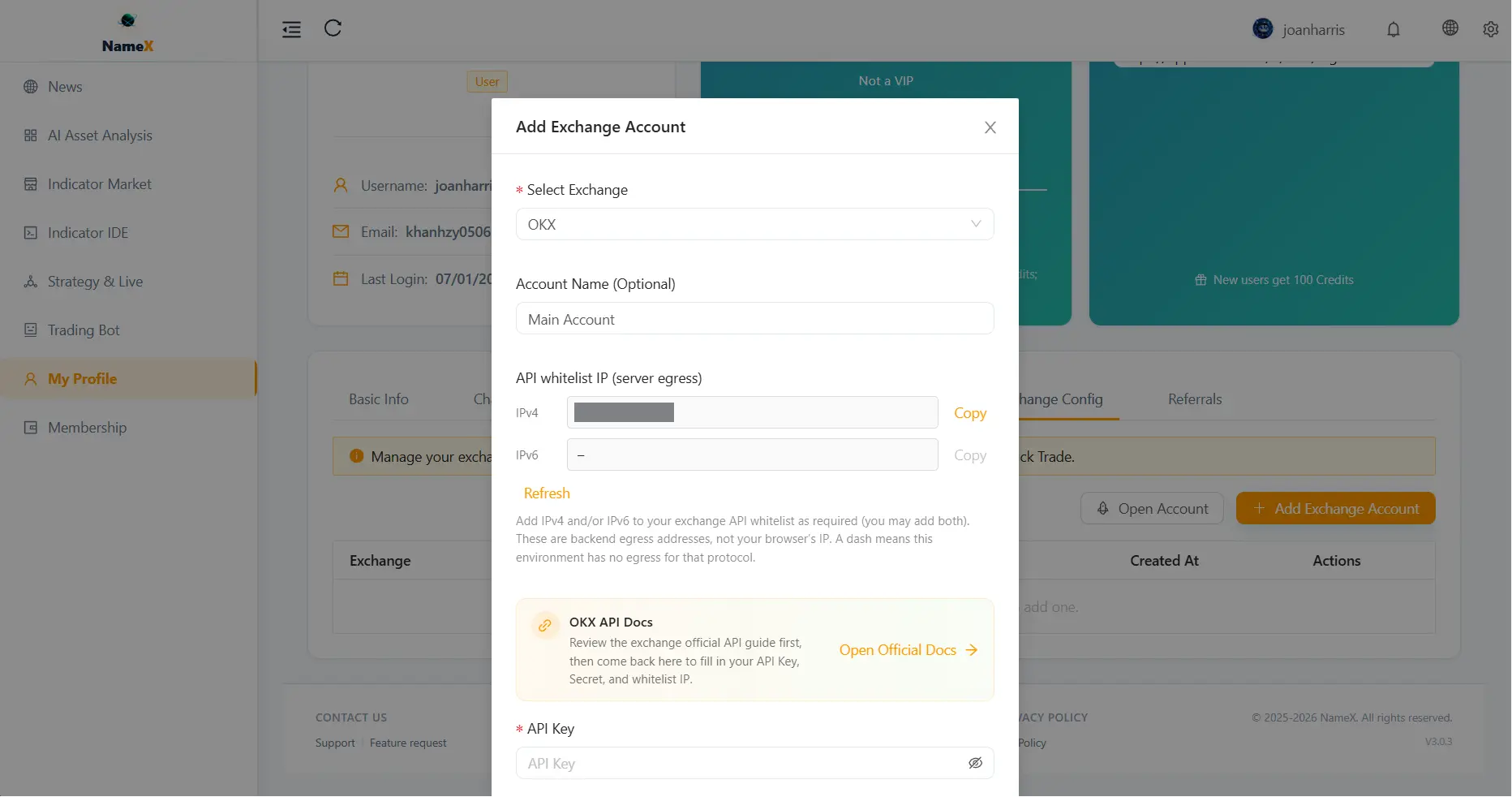
Before generating your API Key on the exchange, you need to get the Whitelist IPs from NameX.
- Go to your Profile > Account Settings.
- Scroll down to the Exchange Configuration section and click Add Exchange.
- Select your desired exchange from the dropdown menu (e.g., Binance, Bybit).
- The system will display the Whitelist IPs (both IPv4 and IPv6). Copy these IPs.
- Create the API Key on your exchange (using the official guides below) and paste the NameX IPs into the exchange's IP restriction field.
- Once the API Key is created on the exchange, copy the API Key and Secret Key (and Passphrase if required).
- Return to the NameX Add Exchange modal, paste the keys, and click Test Connection or Save.
What is an API Key?
An API Key (Application Programming Interface Key) acts as a "spare key" and an "authorization card". It allows NameX to securely interact with your exchange account programmatically without ever knowing your actual username or password.
Why do we need it?
Sharing your main login credentials with any third-party service is highly dangerous and can lead to total loss of funds. An API Key solves this by providing a separate, restricted credential designed specifically for software integrations.
When you create an API Key, the exchange usually gives you two pieces of information:
- API Key: Similar to a public username.
- Secret Key (or API Secret): Similar to a password (this is usually only shown once when created).
Permissions (Crucial Security Step)
The biggest advantage of an API Key is that you can strictly control its permissions:
- Read Only: Allows the platform to view your balances and trading history. (Used for portfolio tracking).
- Enable Trading (Spot/Futures): Allows the platform to place buy and sell orders on your behalf. (Required for Trading Bots on NameX).
- Enable Withdrawals: NEVER enable this permission. NameX does not require withdrawal permissions, and granting it to any third party puts your funds at risk.
What is an IP Whitelist?
An IP Whitelist (or Trusted IPs) is a secondary, critical layer of security tied to your API Key. It is a strict list of specific network IP addresses that are permitted to use that API Key.
How it protects you
If your API Key and Secret Key are somehow compromised or leaked, hackers still cannot use them unless they make requests from an IP address that is on your whitelist. Since NameX operates on fixed, secure servers, you will add NameX's server IP addresses to this whitelist. If a request comes from any other IP, the exchange will block it immediately.
Mandatory Requirements
Most major exchanges today have made IP Whitelisting mandatory if you enable the "Trading" permission.
- If you create an API Key with Trading permissions but do not set an IP Whitelist, the exchange will often automatically disable or delete the API Key after 30 to 90 days for your own protection.
- By setting an IP Whitelist, your API Key becomes permanent and infinitely more secure.
Note: When you set up a new exchange connection in the NameX dashboard, you will be provided with the specific NameX IP addresses to copy and paste into your exchange's whitelist.
Official Exchange Setup Guides
Below are the official documentation links for generating API Keys and setting up IP Whitelists on some of the most popular cryptocurrency exchanges:
1. Binance
- Guide: How to Create an API on Binance
- Important: Make sure to select "Enable Spot & Margin Trading" or "Enable Futures" depending on your bot's strategy, and bind the IP addresses provided by NameX in the "Restrict access to trusted IPs only" section.
2. Bybit
- Guide: How to create a Bybit API Key
- Important: Bybit requires you to select "API Transaction" for the API key type. Choose "Only IPs with permissions granted are allowed to access the OpenAPI" and paste the NameX IPs.
3. OKX
- Guide: How do I create an API on OKX?
- Important: Under the "Permissions" section, check "Trade". Enter the NameX IP addresses in the "Link IP addresses" box. You may also need to set a Passphrase specific to this API key.
4. Bitget
- Guide: How to create Bitget API Key
- Important: Ensure you link the IP addresses and note down your API Passphrase, as it is required along with the API Key and Secret Key when connecting to NameX.
Always remember: Keep your API Secret safe and NEVER share it with anyone other than pasting it directly into the secure NameX integration page.